

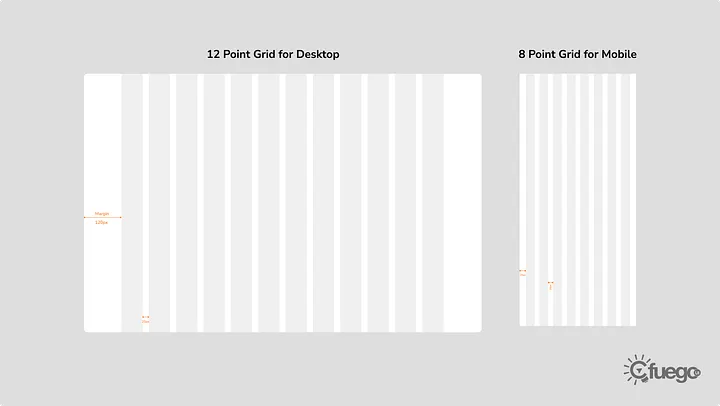
In the dynamic world of digital design, user interface (UI) and user experience (UX) play pivotal roles in determining a product's success. As designers strive to create visually appealing and user-friendly interfaces, layout grids emerge as a fundamental principle that significantly influences the overall design process. A layout grid serves as an invisible backbone, providing structure and harmony to a design, making it an indispensable tool for UI/UX professionals.
Below are some of the benefits of using a grid system for designing:
Visual Consistency:
One of the primary benefits of employing layout grids is establishing visual consistency. Consistency is key to creating a seamless and intuitive user experience. A well-defined grid system ensures elements are aligned, balanced, and proportioned correctly throughout the interface. This uniformity not only enhances the aesthetic appeal but also helps users navigate the application with ease, promoting a sense of familiarity and coherence.
Efficient Organization:
Layout grids aid in systematically organizing complex information and content. By dividing the screen into logical sections or columns, designers can allocate space effectively for different types of content such as text, images, and interactive elements. This organization contributes to a cleaner and more digestible interface, preventing information overload and allowing users to focus on the most relevant content.
Responsive Design:
In the era of diverse devices and screen sizes, responsive design has become a necessity. Layout grids are instrumental in creating responsive interfaces that adapt seamlessly to various screen dimensions. By setting up flexible grids, designers can ensure that the layout adjusts gracefully, maintaining a harmonious structure across different devices. This responsiveness is crucial for delivering a consistent and enjoyable user experience, regardless of the user’s device.
Streamlined Collaboration:
For design teams working collaboratively, layout grids serve as a shared framework that fosters collaboration and streamlines the workflow. With a consistent grid system in place, designers can communicate their ideas more effectively, ensuring that everyone involved in the project follows the same design principles. This shared foundation reduces the chances of misunderstandings, enhances productivity, and facilitates a smoother design process.
Accessibility and Readability:
An often overlooked aspect of UI/UX design is accessibility. Layout grids contribute significantly to the accessibility of a design by promoting readability and clarity. Proper spacing and alignment ensure that text is legible, interactive elements are easily distinguishable, and colour contrast is sufficient. This consideration is vital for creating designs that are inclusive and can be comfortably experienced by users with varying abilities.
Enhanced User Flow:
A well-structured layout grid guides users through the interface, influencing their navigation patterns and interaction with the product. By strategically placing elements within the grid, designers can create a natural flow that directs users’ attention to essential information and actions. This deliberate arrangement contributes to a more intuitive user experience, reducing friction and enhancing overall satisfaction.
Conclusion:
In the ever-evolving landscape of UI/UX design, layout grids stand as a fundamental and indispensable tool. Beyond their role in providing visual consistency and organization, layout grids contribute to responsive design, streamlined collaboration, accessibility, and improved user flow. Designers who prioritize the implementation of layout grids in their projects not only create aesthetically pleasing interfaces but also deliver experiences that are intuitive, accessible, and user-centric. As technology continues to advance, the importance of layout grids in UI/UX design remains unwavering, serving as a timeless foundation for creating exceptional digital experiences.